May 25, 2026 · Alex, MD
Becoming a prompt master: the one AI skill that actually compounds
The four-part anatomy of a good prompt, two frameworks worth knowing, and the one shortcut that makes all of it accessible even when you are running on empty.
About eighteen months ago I played around with ChatGPT for a few weeks and quietly wrote it off. It felt like an advanced Google search. Useful for looking things up a little faster, maybe, but not the thing people kept saying it was. I moved on.
It did not help that AI had a familiar pitch. Every few years a new tool arrives promising to give time back and reduce the mental load. Most of them add to it instead. I had heard this enough times that the default reaction to anything framed as “this will change how you work” was to wait and see. I had a system that worked well enough. I did not need another thing to learn.
Then I took a short AI course through an executive education program. I almost skipped it. What changed in those sessions had nothing to do with the technology. It had everything to do with what I had been doing wrong. I had been treating it like a gimmick. Funny images with my kids, quick questions, the occasional search I was too lazy to type into Google. I thought I understood what it could do. I did not come close.
Once I understood prompting, the outputs were different. Not slightly different. Different enough that I kept going, kept learning independently, and stopped leaving attention on the table every time I opened the tool. That shift is what this post is about.
What makes this harder for physicians is the invisible load underneath everything. The household, the parenting, the paperwork the hospital does not see, the steady drumbeat of small decisions in every spare minute. Patience for another tool that does not just work runs out faster when your bandwidth is already spoken for. The cost of writing a bad prompt and getting nothing back is not measured in seconds. It is measured in the attention you do not have to spare.
If you only learn one AI skill this year, learn prompting. The tools change. The models change. The companies change. What does not change is this: the better you are at telling an AI what you want, the better the output, every time, with every tool. Prompting is the skill that compounds. Everything else is a feature.
Heads-up before we go further. This post is more involved than my usual one-tip pieces. Bear with me. Prompting is the AI skill that pays dividends on dividends. And if you stay through to the end, you will get the trick I use to follow every best practice in this post without writing the long prompt yourself. It is the shortcut I reach for more than any other.
The good news is that prompting is not engineering. The phrase “prompt engineering” is a bit of an overpromise. What you really need is the discipline of writing a paragraph instead of a sentence, asking for a specific format, and iterating once or twice. You spend a little more attention on the prompt up front and the AI spends less of yours later. Below is how I think about it, written for physicians who have about thirty minutes of patience.
The instinct you have to break
The default move when someone opens an AI tool for the first time is to type something short.
“meal plan for the week”
“draft a tough email to my contractor”
“summarize this article”
This is the move that makes everyone decide AI is overrated, because what comes back is generic and bland. Of course it is. You gave it nothing to work with.
Here is what that looks like in practice. Two versions of the same request.
The short version:
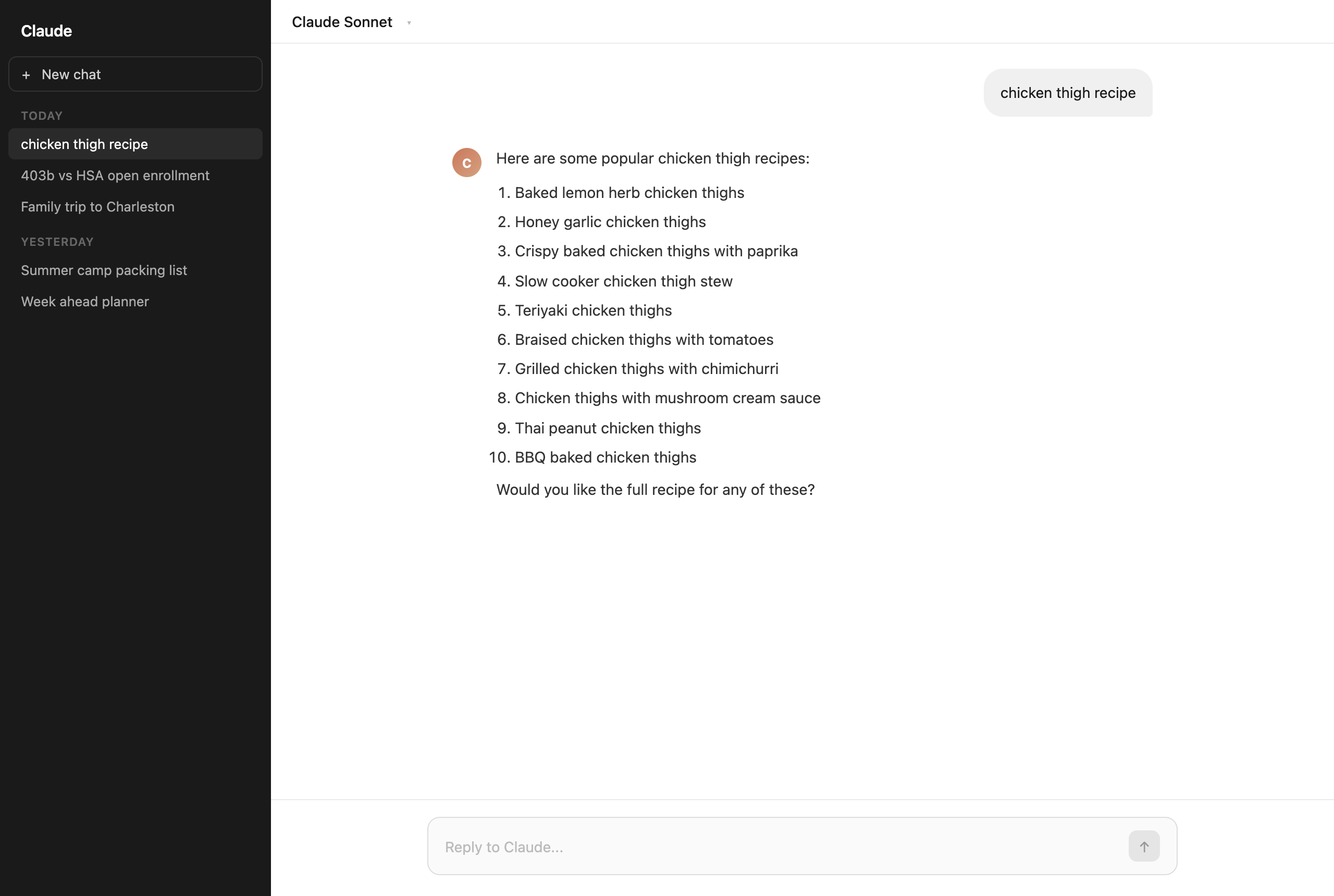
“chicken thigh recipe”
The version that actually works:
“You are a home cook helping a busy family get dinner on the table on a weeknight. I have boneless skinless chicken thighs that need to be used tonight. I have about 30 minutes of active cook time. My two kids do not like spicy food. I have olive oil, garlic, lemon, and standard pantry spices but no fresh herbs. Give me one recipe with a step-by-step method, a note on what sides would work, and a heads-up on any steps I can do in advance to save time.”
The short prompt:
The version that actually works:
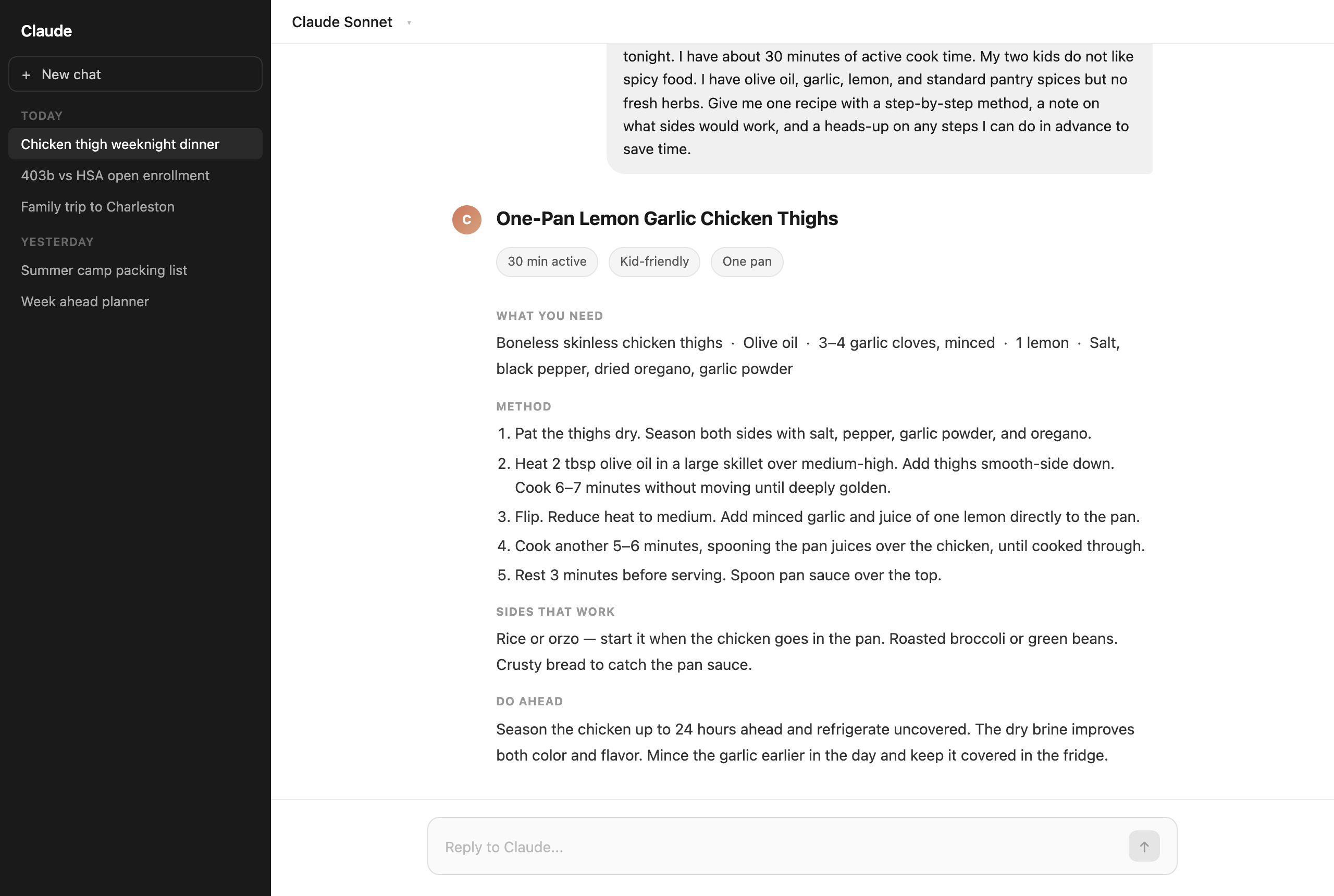
The first prompt gets you a list of ten recipes with no context about what you have, who is eating, or how much time you have. The second gets you exactly what you asked for.
The most consistent advice I can give you is this: write four to six sentences in your prompt, not four to six words. That single change, before any technique, is responsible for most of the difference between people who think AI is magic and people who think it is mediocre.
The four parts of a good prompt
Once you are willing to type more, you can think about a prompt in four parts. You do not have to use all four every time. But knowing they exist is what lets you fix a weak output instead of giving up on it.
Part 1: Role
Tell the AI who it is and who you are.
“You are a financial planner who works with physicians. I am a full-time anesthesiologist. I understand medicine, not finance.”
This sounds silly the first time you do it. It is not. It anchors the tone, the vocabulary, and the depth of the answer.
Part 2: Context
Give it the situation. Constraints. Anything it needs to know that it cannot guess.
“It is open enrollment. My hospital offers a 403b with a 3% employer match. I also have access to an HSA through my high-deductible health plan. I have about $500 a month I could put toward either. I currently contribute enough to get the full employer match on the 403b but nothing beyond that.”
Context is where most of the lift comes from. The more specific, the better.
Part 3: Task
State the actual thing you want, plainly.
“Help me think through whether I should put the extra $500 a month into the 403b beyond the match, or into the HSA.”
If you can write the task as a single sentence, write it as a single sentence. Clarity beats cleverness.
Part 4: Format
Tell it what the output should look like.
“Give me a side-by-side comparison with tax implications explained in plain English. End with a recommendation based on what I have told you, and two questions I should answer before deciding.”
Format is the secret weapon. Asking for a table gets you a table. Asking for “bullet points, max one sentence each” gets you scannable output. Asking for “the answer in plain English, no jargon” gets you the answer in plain English. The AI will do whatever shape you ask for. Most people do not ask.
Putting it together: a complete prompt
Watch how all four parts read together.
“You are a financial planner who works with physicians. I am a full-time anesthesiologist. I understand medicine, not finance.
It is open enrollment. My hospital offers a 403b with a 3% employer match. I also have access to an HSA through my high-deductible health plan. I have about $500 a month I could put toward either. I currently contribute enough to get the full employer match on the 403b but nothing beyond that.
Help me think through whether I should put the extra $500 a month into the 403b beyond the match, or into the HSA.
Give me a side-by-side comparison with tax implications explained in plain English. End with a recommendation based on what I have told you, and two questions I should answer before deciding.”
This is a prompt you would actually use. Five sentences. About forty-five seconds to type. The answer that comes back is a hundred times more useful than what you would have gotten with “help me understand my benefits.”
What changes when you put all four parts together is not just the length. It is the specificity. The AI is no longer guessing who you are, what you already know, what format will actually be useful to you, or how much detail you want. You gave it all of that upfront. The result is an answer that needs one or two follow-ups rather than a full restart.
A quick aside: this is not just vibes
The “write more, ask for a format, iterate” approach is not opinion. There is real research behind it, and the research has held up as models have gotten more capable.
The early dramatic numbers came from 2022. In one widely cited experiment, adding the phrase “Let’s think step by step” to math word problems dragged an older AI from about 18% accuracy to about 79% on a standard benchmark. Same model, same questions, one extra sentence. (Kojima et al., 2022)
On the frontier models we use today (GPT-4 class, Claude 3 class, and their successors), the gaps are smaller. The model is doing some of this work internally now. But the principle still holds. A 2024 systematic review cataloguing more than 200 prompting techniques across modern models found a consistent result: clear instructions, worked examples, and structured format requests continue to outperform short, vague prompts by measurable margins on every major model tested. (Schulhoff et al., The Prompt Report, 2024)
Better prompt, better output. The gap is smaller than it used to be. It has not closed, and it will not.
If you want the fancier version: BRIEF and COSTAR
The four-part anatomy above is mine, stripped down for speed. If you like checklists, there are two named frameworks worth knowing. Both do the same job. Both add a little more structure.
BRIEF is the simpler one. It breaks a prompt into five parts: background (the situation, constraints, and relevant history), role (who the AI is and who you are), instruction (the task, stated plainly), examples (one or two samples of the output shape you want), and format (how the answer should be delivered). If you have those five things, you have a complete prompt.
COSTAR is a little more detailed. It is the one I reach for when the answer needs a specific voice, not just specific content.
- Context. Background and situation.
- Objective. What you want the AI to do.
- Style. The writing style. (“Like a magazine feature.” “Like a checklist.” “Like a friend explaining over coffee.”)
- Tone. Formal, warm, urgent, dry.
- Audience. Who the answer is for.
- Response format. Table, bullets, paragraph, email, etc.
Quick COSTAR example, for an end-of-year letter to my tenants:
“Context: I own a small two-property rental portfolio in Rhode Island. My tenants have been good and I want to renew their leases for another year at the same rent.
Objective: Draft a renewal letter that thanks them, formally offers the renewal, and confirms the new dates and terms.
Style: Like a thoughtful landlord, not a corporate property manager.
Tone: Warm, professional, brief.
Audience: Two longtime tenants, both adults, both reasonable.
Response format: A one-page letter, four short paragraphs, no legal boilerplate.”
You could write the same thing with my four-part framework. You could write it with no framework at all if you have the time to push back on a bland first draft. But if you want a name for what I do most of the time, it is a stripped-down COSTAR. Same idea, less ceremony.
There is one more reason these frameworks are worth knowing, and it comes up in a moment. When you ask an AI to write your prompt for you, naming COSTAR or BRIEF is what tells it exactly what shape to build. The framework becomes the scaffold. You just fill in the details. That trick is far more powerful when you understand what the framework is actually doing.
The iteration loop
A good first prompt usually gets you to a B+ answer. The iteration loop is how you close the gap. Each round, you go back into the conversation and add what was missing from the original prompt — context you forgot to include, a format that did not quite land, a constraint that would have changed the answer. The AI holds the full conversation in memory. Every follow-up builds on everything before it. You are not polishing the output. You are improving the prompt, one piece at a time.
Here is what that looks like in practice. After the first response comes back, you might add something you forgot: “I forgot to mention — I am in the [XX%] federal tax bracket. Does that change the recommendation?” Once that lands, you tighten the format: “The comparison table is too long. Cut it to the three most important differences and drop the rest.” Then you reframe the output for how you will actually use it: “Now summarize this in two bullet points I can bring into a conversation with my financial advisor next week.”
Just talking. Like to an intern. Two or three rounds and you have what you actually wanted. The whole loop takes less than ten minutes.
The mistakes I see most often
When colleagues show me prompts that did not work, the pattern is almost always one of the same three things.
The first is length. The prompt was too short. We covered that. But two related mistakes compound the problem. One is asking for an opinion when you needed an option list. Ask “what should I do” and you get a single answer. Ask for five options with pros and cons and a recommendation at the end and you get something you can actually choose from. The other is letting a vague first answer sit. If the output is too generic, do not start over. Push back on the specific part that is weak: “The HSA recommendation is too vague. I am generally healthy and rarely hit my deductible. Give me a clearer answer with that in mind.” The model has your full context already loaded. Use it.
The second pattern is misunderstanding what AI is. It is not a search engine. “Hawaii vacation ideas” is a search. “Plan a six-day family trip to Maui in October for two adults and two kids, light hiking but not strenuous, one beach day, a budget around X, give me a day-by-day with restaurant suggestions” is a prompt. They return very different things. Related: AI is confident even when it is wrong. For anything where being wrong matters — math, citations, real-world facts — check the work. Trust but verify.
The third is one I will keep repeating regardless of context. Do not put patient data into a consumer AI tool. Not PHI, not case details, nothing identifiable. Consumer tools are not the place for it, ever.
Use an AI to write your prompt
If I am giving someone one AI tip to start with, this is it. It is also the one I reach for myself every single day, not just when I am tired or stuck.
Out of everything in this post, this is the move that matters most for getting real value out of what you are paying for. A quality AI subscription is not cheap. Writing a weak prompt and getting a mediocre answer back is the most expensive thing you can do with it — you spent the cost of a real question and walked away with nothing useful. This trick nearly eliminates that problem. It is the first thing I share with anyone who is just getting started, and it is the last thing I would give up.
Take whatever rough sketch is in your head, paste it into the AI, and ask it to turn that sketch into a proper prompt. Then run the cleaned-up prompt in the same tool, or copy it into a different one.
It looks like this:
“You are a prompt engineer. I want to ask an AI to help me [ROUGH DESCRIPTION OF WHAT YOU WANT]. Write me a clean, structured prompt using the COSTAR framework that I can paste into ChatGPT or Claude. Make reasonable assumptions where I have not given you enough information, and call those assumptions out at the top so I can correct them.”
The output is a prompt. You read it, edit anything that is wrong, and send it. Two minutes of work, much better answer than if you had typed something off the cuff.
This trick is useful in three situations. When you are tired. When the task is unfamiliar enough that you do not know what to ask for. When you are stuck on a vague answer and cannot figure out which part of your prompt is the problem.
The last time I used it was planning a family trip. I knew it needed flights, hotels, a loose itinerary, and restaurants that would not bore the kids. I did not have an hour to think about how to structure all of that into one good prompt. So I asked an AI to write the prompt for me. Thirty seconds later I had a clean, parameterized travel prompt with bracketed slots for destination, dates, budget, and ages. I pasted that into a different tool, filled in the brackets, and had a usable itinerary five minutes after.
I keep this meta-prompt saved. It is one of the most-used items in my library.
On Thursday I will share the prompts I actually use — five copy-paste templates you can adapt this week, the saving habit that makes them compound over time, and one more technique worth knowing. It is the practical half, and it is shorter.
See you Thursday.
Strictly non-clinical. Nothing on this site is medical advice. I do not post about patient care.