May 28, 2026 · Alex, MD
The six prompts I keep saved
Six copy-paste prompt templates for the tasks physicians repeat most: planning the week, making decisions, staying current with the literature, modeling a rental, starting the morning, and handling dinner around the call schedule.
Tuesday was the anatomy. This is the part you can use today.
Part 1 covered the four-part framework, two named templates, and the shortcut of asking an AI to write your prompt for you. If you missed it, that is the foundation. This post assumes you have about thirty seconds of patience and one task on your plate that you keep putting off.
What follows are six prompts I actually have saved. Not hypothetical ones. Not cleaned-up versions of something clever. The ones I open, fill in the brackets, and run.
Before we get into them: the saving habit matters more than the prompts themselves. A prompt you wrote once and tested is better than one you are constructing tired from scratch. Save them somewhere one tap away. I use SideNotes. A note in your phone works. The second time you use a saved prompt, it gets faster. After five uses, it feels like your own.
Here are the six.
Six copy-paste prompts
Pick the one that fits a task you have this week. Use it. Tweak the bracketed parts. That is the entire learning curve.
1. The week ahead planner
“You are a personal chief of staff helping a busy physician plan the week ahead. Here is my calendar: [PASTE OR DESCRIBE YOUR SCHEDULE]. Here is what else is on my plate that is not on the calendar: [LIST OF OPEN TASKS, DECISIONS, AND THINGS YOU ARE AVOIDING]. My top priority this week is: [ONE THING]. Roughly how much unscheduled time I have: [ESTIMATE].
Give me: a prioritized plan with one clear focus per day, a flag on anything that looks at risk of not getting done, two or three things I should consider deferring to next week, and one thing I should probably just stop carrying around entirely.”
I run this on Sunday nights. It takes about three minutes to fill in. The output is not a schedule. It is a reality check. The “one thing I should stop carrying” is usually worth the whole exercise by itself.
2. The decision packet
“I am trying to decide between [OPTION A] and [OPTION B] for [CONTEXT]. The factors I care about most are: [LIST 3 TO 5]. The factors I care about less, but should not ignore: [LIST]. What I do not know yet: [LIST OPEN QUESTIONS].
Give me: a side-by-side comparison table, then a short paragraph on which one I should probably pick and why, and a list of the three questions I should answer before committing.”
This works for almost any decision above a certain complexity threshold. Which vendor. Which appliance. Which policy option. The table forces you to articulate what you actually care about. The “three questions before committing” usually surfaces the one thing you were hoping not to think about.
3. The literature digest
“You are a clinical research assistant helping a busy physician stay current. I am a practicing anesthesiologist with limited reading time. I want the five most impactful articles published in the last 30 days in my field. Define ‘impactful’ as articles that change practice, generate significant discussion, or come from high-impact journals.
For each article: a link, a two-sentence summary of what it found, and one sentence on why it matters clinically. Format as a numbered list. No filler. Skip commentary on older work unless it substantially changes interpretation.”
I run this weekly. Anesthesiology has a steady stream of new literature and I cannot read it all. The framing of “impactful” is what makes the output usable. Without it, the model returns whatever is most recent, not what is worth knowing about. Verify the links. The model is occasionally wrong about whether a paper is real, and on something like this, being wrong matters.
4. The rental model
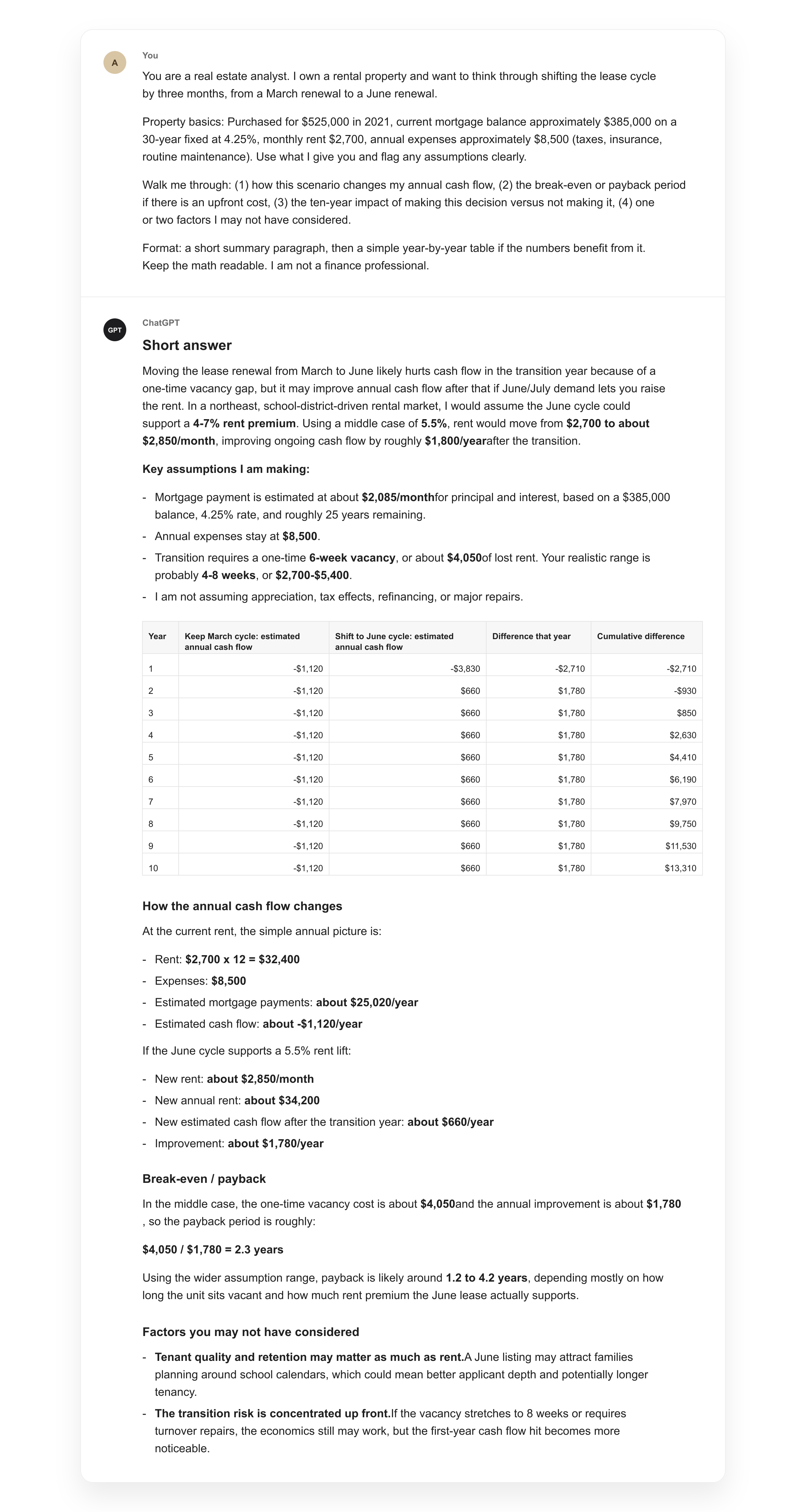
“You are a real estate analyst. I own a rental property and want to think through [SPECIFIC SCENARIO, e.g., a refinance in year three, raising rent, shifting the lease cycle by two months, replacing a major system].
Property basics: [PURCHASE PRICE OR ROUGH EQUITY POSITION, CURRENT MORTGAGE TERMS, MONTHLY RENT, ROUGH ANNUAL EXPENSES]. Use what I give you and flag any assumptions clearly.
Walk me through: (1) how this scenario changes my annual cash flow, (2) the break-even or payback period if there is an upfront cost, (3) the ten-year impact of making this decision versus not making it, (4) one or two factors I may not have considered.
Format: a short summary paragraph, then a simple year-by-year table if the numbers benefit from it. Keep the math readable. I am not a finance professional.”
The lease timing version of this was the most useful thing I ran last year. I had been renewing leases whenever they came up without thinking about the seasonal rental market. Running this against the local market cycle showed me what I was leaving on the table. Not a complicated model. Just a structured framing of a question I had been quietly avoiding.
5. The morning routine
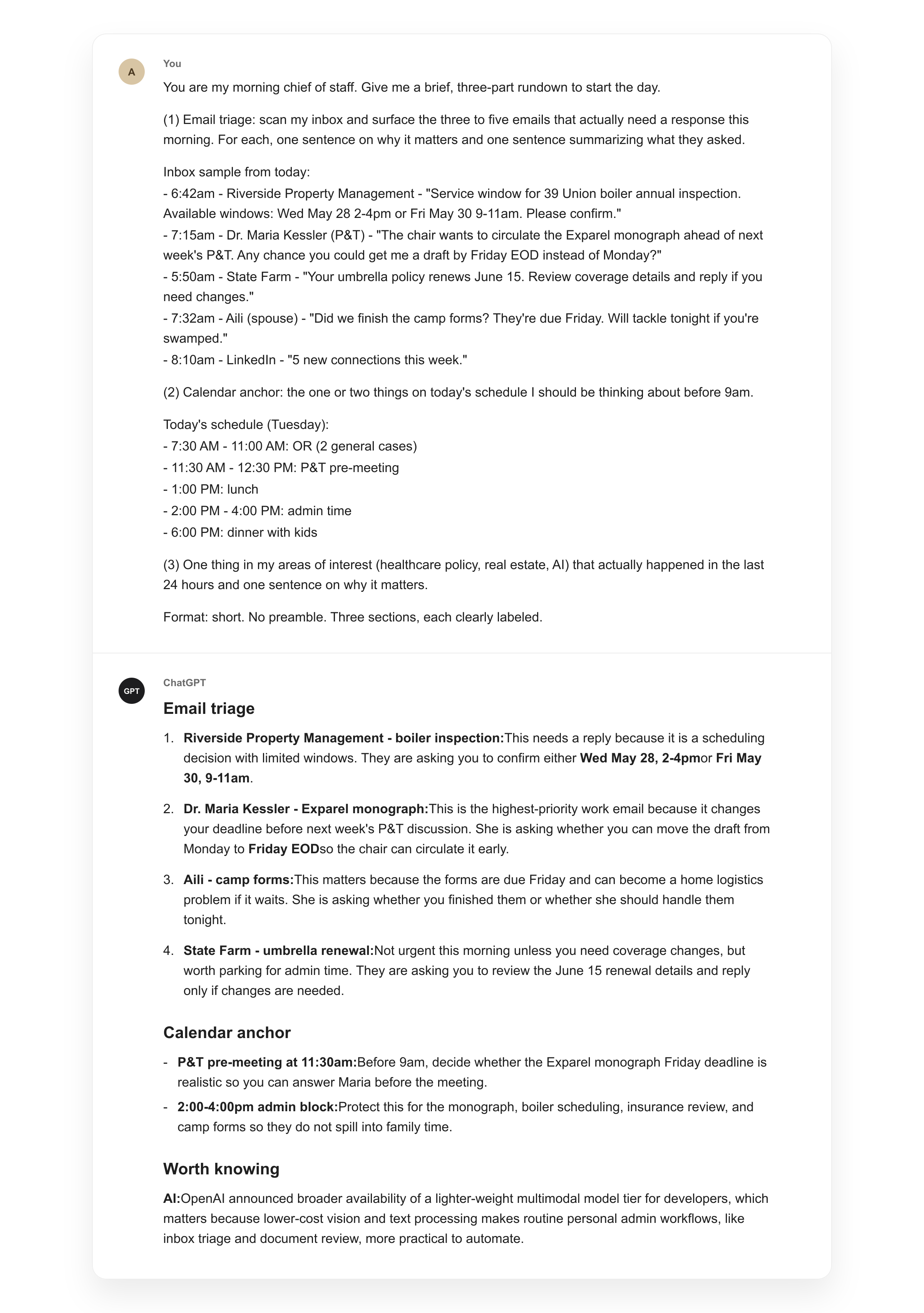
“You are my morning chief of staff. Give me a brief, three-part rundown to start the day. (1) Email triage: scan my inbox and surface the three to five emails that actually need a response this morning. For each, one sentence on why it matters and one sentence summarizing what they asked. (2) Calendar anchor: the one or two things on today’s schedule I should be thinking about before 9am. (3) One thing in my areas of interest, [LIST: e.g., healthcare policy, real estate, AI, local news], that actually happened in the last 24 hours and one sentence on why it matters.
Format: short. No preamble. Three sections, each clearly labeled.”
This replaced the morning scroll. The email triage piece is what earns its keep on busy mornings. Walking into the day with a clear picture of what is waiting, the one anchor task that matters most, and one signal from the world I actually care about is the difference between a calm first hour and a reactive one. The prompt assumes the tool has access to your inbox and calendar. Most major AI apps can be wired up for this. If yours cannot, drop the email and calendar pieces and keep the news section.
6. The call-aware dinner plan
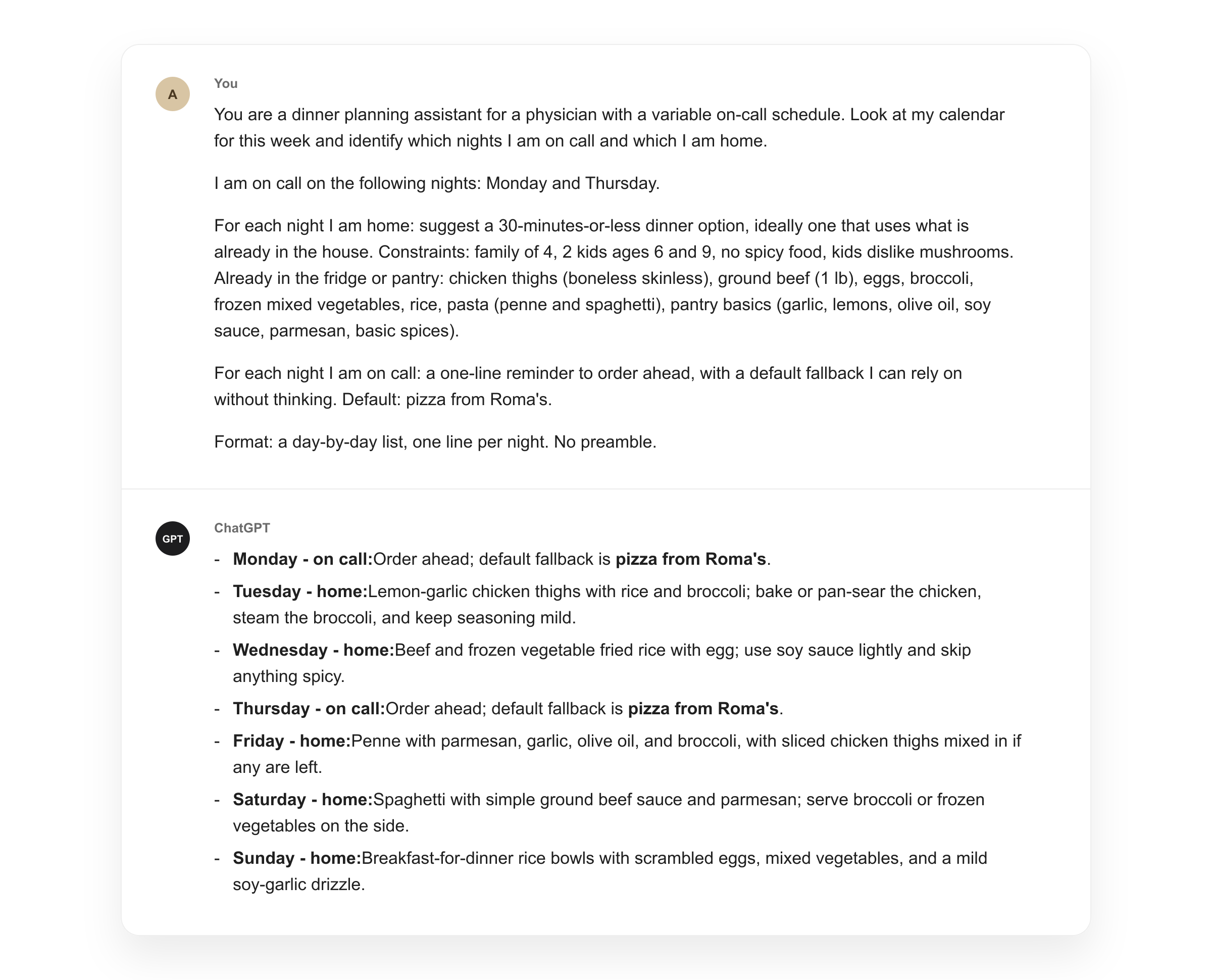
“You are a dinner planning assistant for a physician with a variable on-call schedule. Look at my calendar for this week and identify which nights I am on call and which I am home. (If your calendar does not show call directly: I am on call on the following nights: [LIST].)
For each night I am home: suggest a 30-minutes-or-less dinner option, ideally one that uses what is already in the house. Constraints: [DIETARY CONSTRAINTS, NUMBER OF EATERS, AGES]. Already in the fridge or pantry: [QUICK LIST].
For each night I am on call: a one-line reminder to order ahead, with a default fallback I can rely on without thinking.
Format: a day-by-day list, one line per night. No preamble.”
This one took longer to land than the others because the constraint that matters is not what is in the fridge. It is the call schedule. A meal plan that ignores call is a meal plan that gets abandoned by Tuesday. Letting the AI read the schedule and make the call between “what to cook” and “what to order” removes the decision point at 6pm when you have the least energy to make it. The reorder reminder is small. It is also the difference between eating something reasonable on a call night and stopping at the drive-through on the way home.
One more thing worth knowing
Add the phrase “think step by step before answering” to any prompt where you want a careful, methodical response rather than a quick answer. It forces the model to reason through the problem before committing to a conclusion. That is the same reason you would not want a colleague to give an off-the-cuff opinion on something that deserves actual thought. It works on every model. We do not entirely know why.
The point
These are the ones I actually use. That is the whole point.
The frameworks in Part 1 explain how a good prompt works. These six show what that looks like in practice, across the tasks that come up again and again in a physician’s life outside the hospital. Save the ones that fit. Edit the brackets to match your situation. Run them a few times until they feel automatic.
AI handles the watching. You handle the judgment. These prompts are how you keep the second part to yourself.
This is what a little breathing room looks like.
From prompt to skill
Saving the prompts is step one. There is a step above that, and a Reel going up later today shows it.
The move: take a prompt that already works, wrap it with its instructions and reference material, and the AI stops asking you to paste anything. You name it. You call it. It runs. Every time. Exactly the way you taught it.
Different tools use different words for it. Custom GPTs in ChatGPT. Projects in Claude.
In the newer interfaces, it has settled into one word.
Skill.
Because that is what it becomes. The AI develops a skill it did not have before, on a task you do all the time, and from then on it runs on command. The six prompts above are the seeds. The Reel shows what they look like once they have grown into skills.
Follow along on Instagram and Threads later today. It is the most useful thing I have learned in the last six months.
Strictly non-clinical. Nothing on this site is medical advice. I do not post about patient care.