June 2, 2026 · Alex, MD
Where your AI chats actually go
A personal AI account is not an enterprise account. Where your words actually end up once you type them into ChatGPT, Claude, or Gemini, and the one rule that decides what is safe to provide.
Recently, a family member started reading my blog and quickly started using several of the AI tools that I discuss.
They came back pretty quickly with the question I should have had a cleaner answer for:
“What is it safe for me to put into my chat boxes?”
With that, I started to think about this post.
The family member also works in medicine. They are very AI fluent and already using many of the tools within their work. Which is exactly why the question landed. This was not someone asking from zero. This was someone already using AI and realizing the next layer matters.
Knowing how to prompt is not the same thing as knowing where your words go.
So Part 1 is the map: what happens to the words you type into AI. Part 2, on Thursday, is the practical decision: what is actually safe to provide.
Two different worlds
The easiest way to get confused is to treat every AI account like the same thing.
They are not.
So I personally am very active using tools provided by my employer. I am fortunate that the tools provided are comprehensive, allow integration with PHI, and provide advanced access to frontier models. Those tools live inside a governed system: contracts, controls, oversight, approved use cases, and people whose job is to decide what belongs there.
Separate from my work accounts, I have paid applications at multiple AI systems.
Those are different worlds.
A personal paid account can feel just as powerful as the tool at work. It can use the same model. It can write in the same voice. It can sit in the same browser tab. But twenty dollars a month, or two hundred, does not turn a personal account into an enterprise environment.
It buys capability. It does not automatically buy governance.
That distinction matters because I have made a conscious decision about what I will and will not include when using these systems. A key element for me is accepting certain elements of risk when I make the decision to provide data within certain scenarios.
To be clear, I put personal data into AI, accepting certain risks.
I also make certain decisions, like using Plaid through ChatGPT to allow access to specific financial accounts so I can use the most advanced features for financial modeling.
But that is my data.
I would never put patient data or someone else’s data into that system, because that exposes risk that is not mine to take.
Accepting risk on my own behalf is one thing. Accepting it for a patient, family member, colleague, or anyone else is a completely different thing.
Where a chat can actually go
When you type into an AI chat box, the words do not simply vanish after the answer appears.
Depending on the tool, the account type, your settings, and where you live, a chat may become:
- Account history you can scroll back to later
- Material used to improve or train models, if that setting is on
- Safety or abuse-review material, especially if a conversation is flagged
- Feedback material if you click thumbs up, thumbs down, or report a problem
- Stored files or uploaded context
- Connected-app context from email, Drive, calendar, finance tools, or other services
- Backup, retention, or legal-hold data that may outlast your delete button
That is not meant to scare you. It is meant to make the invisible visible.
Most of the time, the chat box feels private because it looks private. One person, one window, one reply. But the privacy story is not set by the design of the box. It is set by the product, the plan, the settings, and the contract behind it.
The rough shape
You do not need to memorize every privacy policy.
You do need the rough shape.
| Account type | Training default, in plain English |
|---|---|
| Employer / enterprise / business / API accounts | Generally no training by default under commercial terms. Still confirm your exact workplace plan, BAA (Business Associate Agreement) and DPA (Data Processing Addendum) status, admin settings, and approved-use rules. |
| ChatGPT consumer accounts (Free, Plus, Pro) | May be used for training unless you turn that off. OpenAI calls the setting “Improve the model for everyone.” Temporary Chat is separate and is not used for training. |
| Gemini consumer accounts (Free, Advanced) | Used to improve and train models when Keep Activity is on. Turning Keep Activity off stops future chats from being used for model training, unless you submit feedback. A 72-hour safety copy is still kept, and human-reviewed chats can be retained up to 3 years. |
| Claude consumer accounts (Free, Pro, Max) | Your choice, with exceptions. Anthropic says it uses chats for model improvement if you allow it, if a conversation is flagged for safety review, or if you explicitly opt in. Feedback can also be used. |
That is the cleaner version of the rule I wish I had in my head earlier:
Free consumer tools are not one category. Some train by default. Some depend on a setting. Assume you need to check.
Commercial and enterprise accounts usually do not, because that is part of the contract.
Paid personal accounts are the messy middle. By default, your data may or may not be used depending on the provider and your settings.
That last category is where most of us live. It is also where the assumptions get dangerous. A paid personal account feels official. It feels like you upgraded into safety. But usually, you upgraded into better features, not into a governed workspace.
What the setting looks like
If you want to actually find these controls, here is where they live today. The names and locations move, so treat this as a starting point, not gospel.
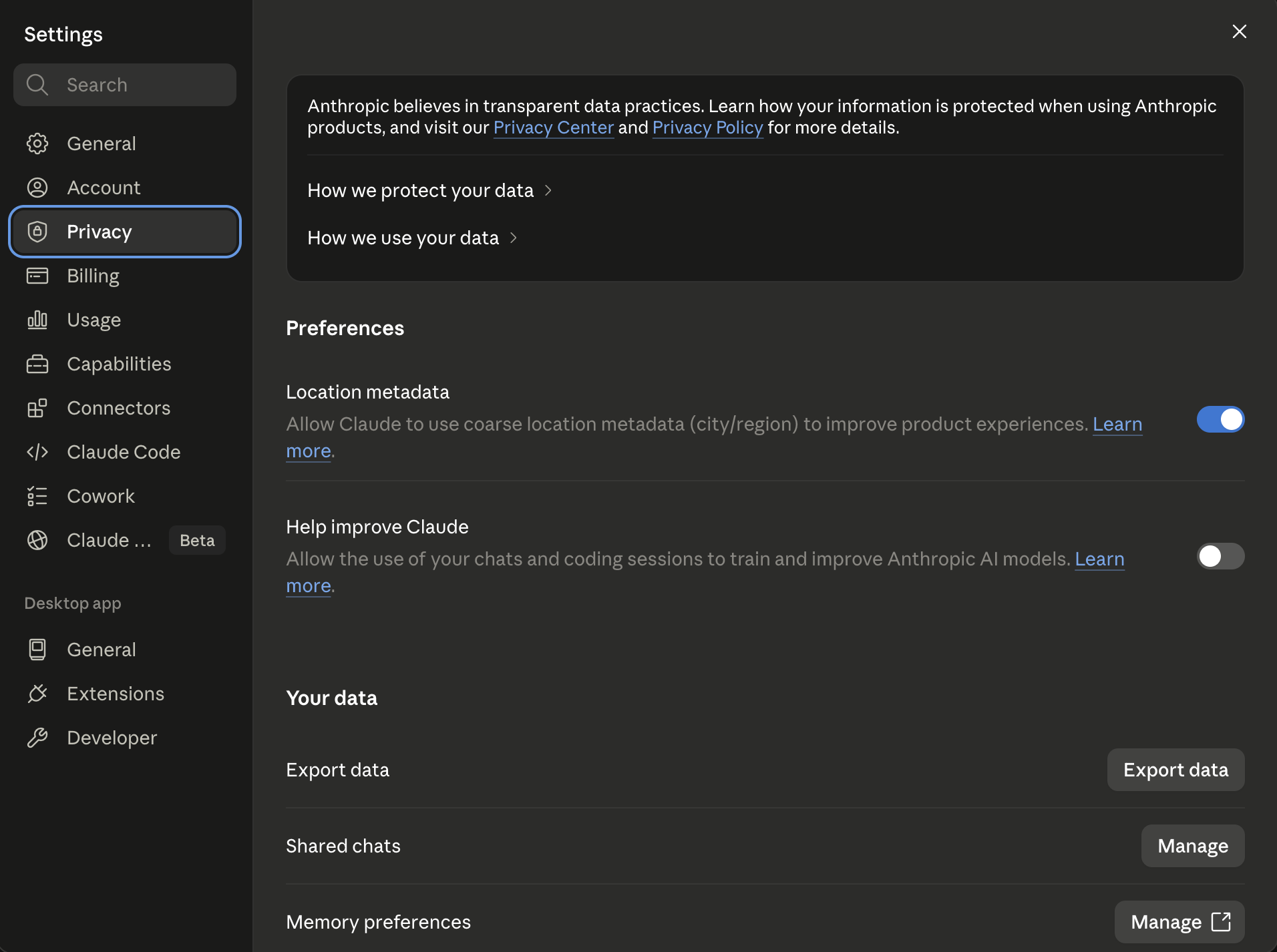
Claude. Settings, then Privacy. The switch is “Help improve Claude.”
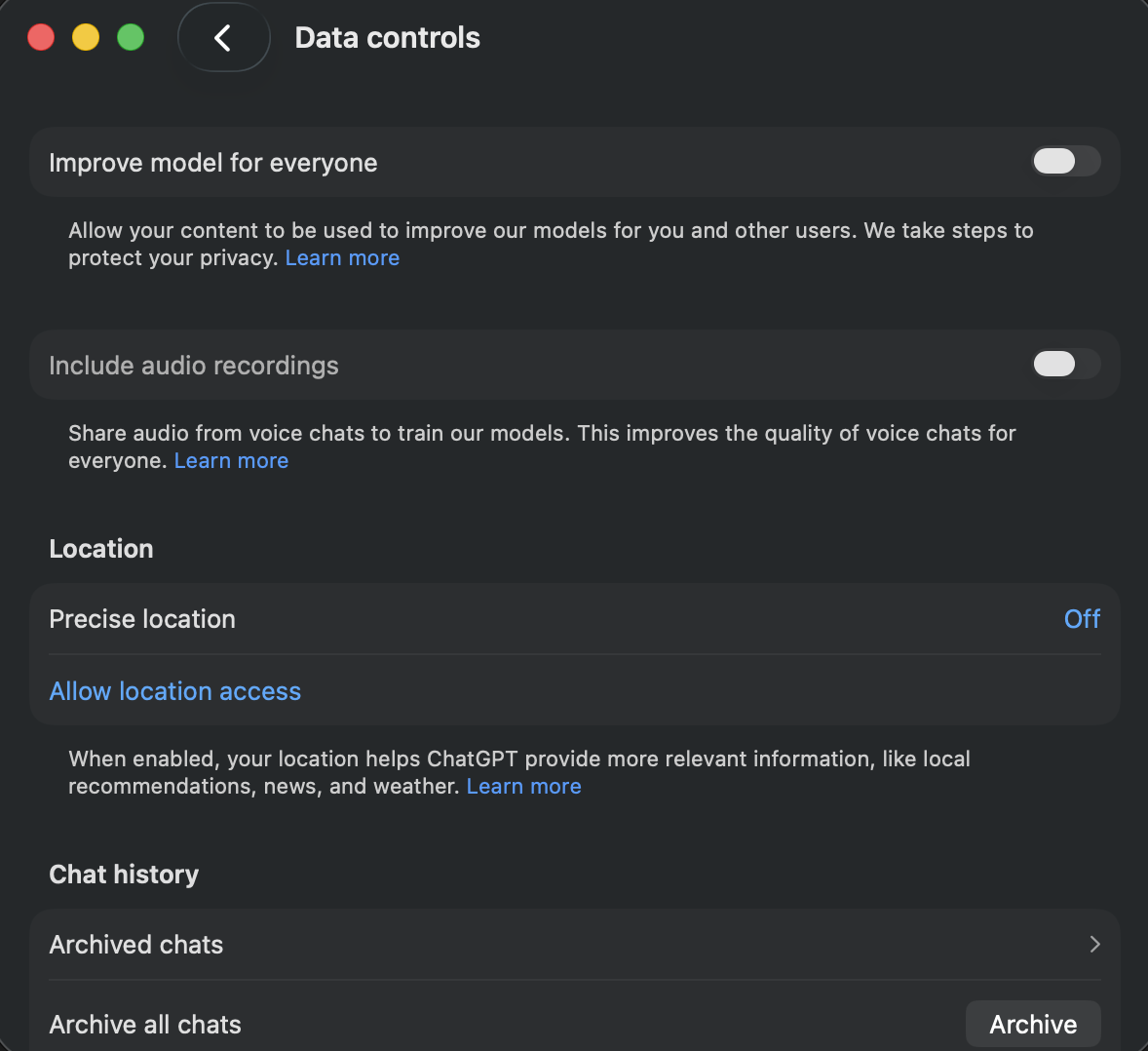
ChatGPT. Settings, then Data controls. The switch is “Improve the model for everyone.”
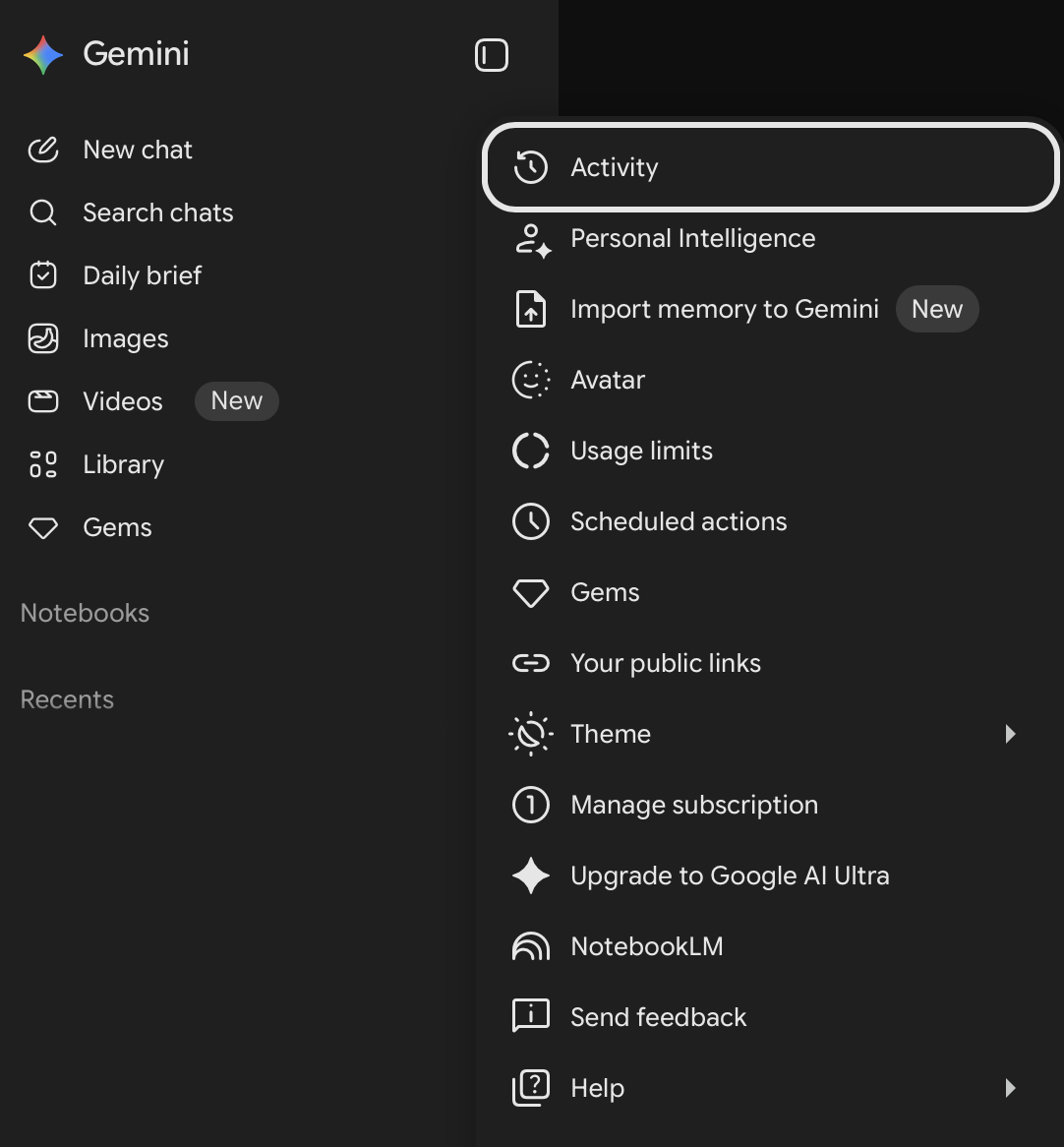
Gemini. Open the menu and choose Activity.
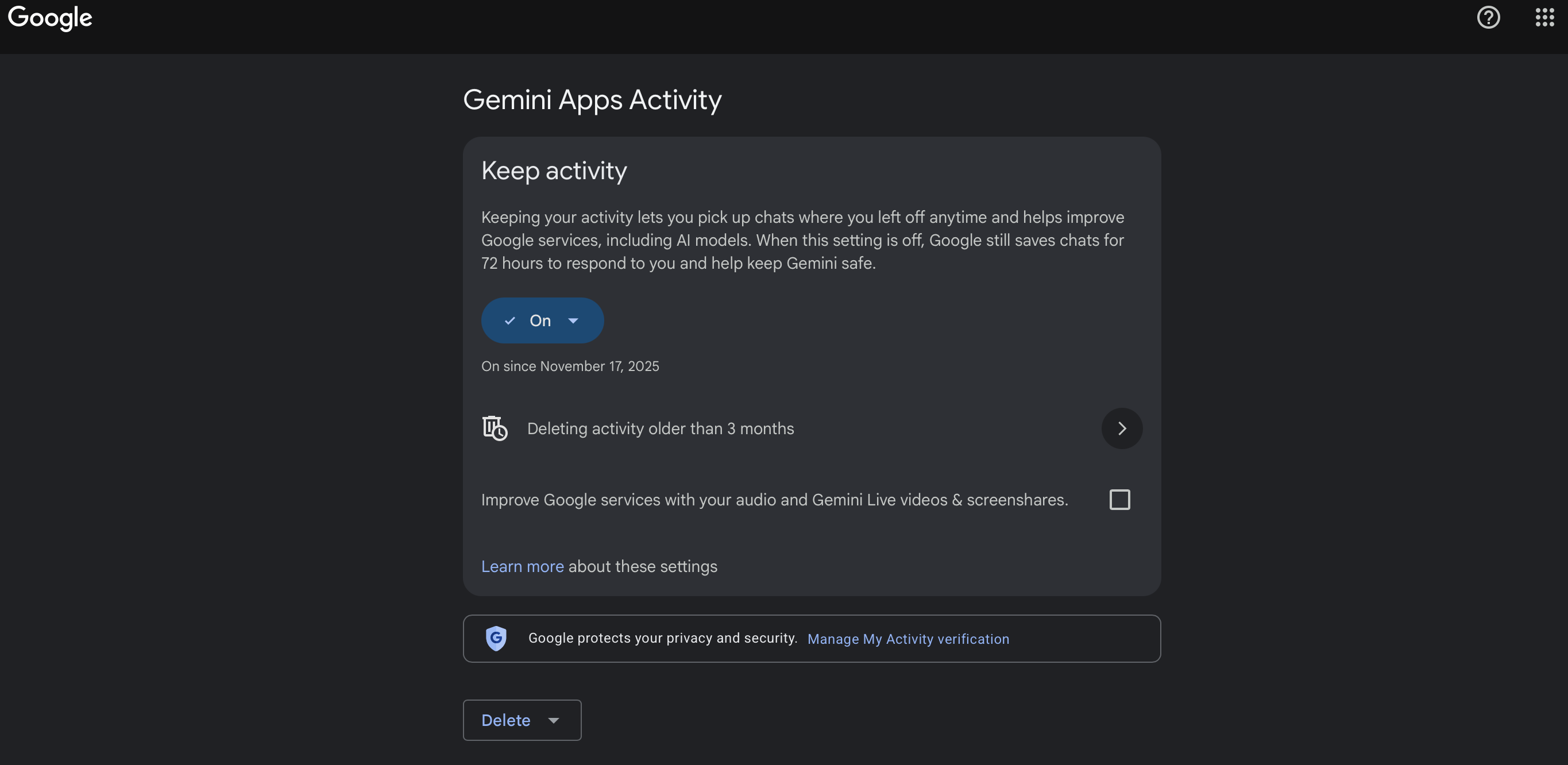
That opens Gemini Apps Activity, where “Keep activity” controls whether your chats are saved and used to improve Google services, including AI models.
The part that keeps changing
The other problem is that these elements are always changing.
Defaults change. Settings get renamed. Retention windows move. New features add new paths for data to travel. A provider can update its terms quietly enough that you only notice if you are paying attention.
So it is very important to keep an eye on the process so you are not caught by a change.
You do not need to become a privacy lawyer. You do need a small habit:
- Check privacy and data controls every few months
- Recheck after a major product update
- Read the short version when a provider emails about terms changing
- Treat new connectors, agents, memories, and file uploads as new decisions, not just new features
The goal is not paranoia. The goal is informed consent.
You can choose to accept some risk. I do. But you should know which risk you are accepting, whose data is involved, and whether the decision is yours to make.
So what is safe?
So now that you know how your data is likely being used, how can we figure out what is safe to actually provide when using AI?
That is the Thursday post.
Because the real decision is not just “does this company train on my data?”
The real decision is:
Is this my risk to accept?
That question is the line I keep coming back to. Personal travel plans, meal planning, home projects, my own financial modeling: maybe. Patient data, employer-confidential material outside approved systems, someone else’s private information: no.
Not because AI is bad.
Because the risk is not always mine to take.
Sources
- OpenAI: How your data is used to improve model performance
- OpenAI: Enterprise privacy at OpenAI
- Anthropic: Consumer model training
- Anthropic: Commercial model training
- Google: Gemini Apps Privacy Hub
- Google: Generative AI in Google Workspace Privacy Hub